How to stimulate your customer base with My Network and boost your sales
Last updated: July 21, 2026
Optimise your business relationships with My Network, your partner in effective, personalised communication with clients and prospects. Whether you're encouraging first-time purchases or fostering loyalty with existing customers, discover how this tool can maximise your sales on Ankorstore and strengthen ties with your retailer network.
As a reminder: My Network is Ankorstore's CRM tool. It allows you not only to list, manage and communicate with all your business contacts in one place, but also to invite new contacts to join Ankorstore.
Why it is essential to communicate directly and regularly with your retailers
As a brand, you have three main levers to boost sales and strengthen customer relations
Increase the average value of your retailers' orders.
Increase your retailers' purchase frequency.
Promote discovery and expand your retailer network.
What information are the retailers who work with you looking for ?
Retailers are looking for precise information about your brand and products to help them organise their assortment and purchasing strategy. They want to be sure that they can sell your products easily.
Relevant information to share with retailers :
Details about your brand’s universe and product ranges (seasonal products, bestsellers).
New products and collections, along with storytelling to help retailers buy and, above all, sell your products.
Sales recommendations : assortment, merchandising tips based on shop type, practical advice.
Discounts on catalogues with explanations (e.g., clearance items from previous collections).
How to use My Network to effectively target your clientele
Overview of My Network
My Network is Ankorstore’s CRM tool, designed to help you manage your professional contacts, interact and communicate with them, and invite them to the platform.
You’ll find :
A directory of your retailers, centralising information about your Ankorstore clients, prospects, and historical clients imported into the tool.
Information on retailers' profiles and their order history on Ankorstore.
Filters that allow you to segment your contacts.
Examples of client information available in My Network
Under the “Manage your contacts” section, you’ll find details for each retailer in your directory, such as :
Store name.
Their e-mail address.
Their telephone number.
The country where the shop is located.
And more.
In this section you can also download the list of your contacts.
Managing your My Network contact list
How to add retailers to your contact list on My Network
You can easily add your prospects and historical customers to Ankorstore. Go to the My Network tab in your account, then click on the ‘New contacts’ button on the top right of the screen.
How to remove retailers from your contact list on My Network
On My Network, you can only delete imported retailers who have never placed an order with your brand on Ankorstore. To do this, select them under “Manage your contacts” and click on “Delete contact(s).”
Best Practice : We suggest you regularly check the list of your retailers added to My Network. If you notice that a prospect has not consulted your latest campaigns, it's best to remove them from your contact list. In this way, you can maintain an active and committed network and avoid sending unwanted communications.
How do the filters work ?
Two types of filters are available on My Network :
“Advanced filters" : these allow you to filter your retailers according to specific criteria such as order history or shop details.
“Segments" : we've included these combinations of several predefined filters to help you easily target certain specific retailer profiles.
When you select filters or segments, your list of retailers will be updated in real time. You can view these updated lists in the ‘Manage your contacts’ section. You can also export them.
How can I download my filtered contact lists ?
You can download lists of filtered contacts to carry out your own analyses or follow-ups.
Use the available filters to precisely target the customers that interest you. Once you have chosen your filters, all you have to do is :
To click on the download button (see image below). A CSV file will be downloaded to your computer.

Import the CSV file into Excel or Google Sheets.
How to encourage orders by offering a personalised discount via My Network
You can apply a personalised discount to the retailers of your choice, directly from My Network. All you have to do is select the concerned retailer and then click on “Apply a discount”.
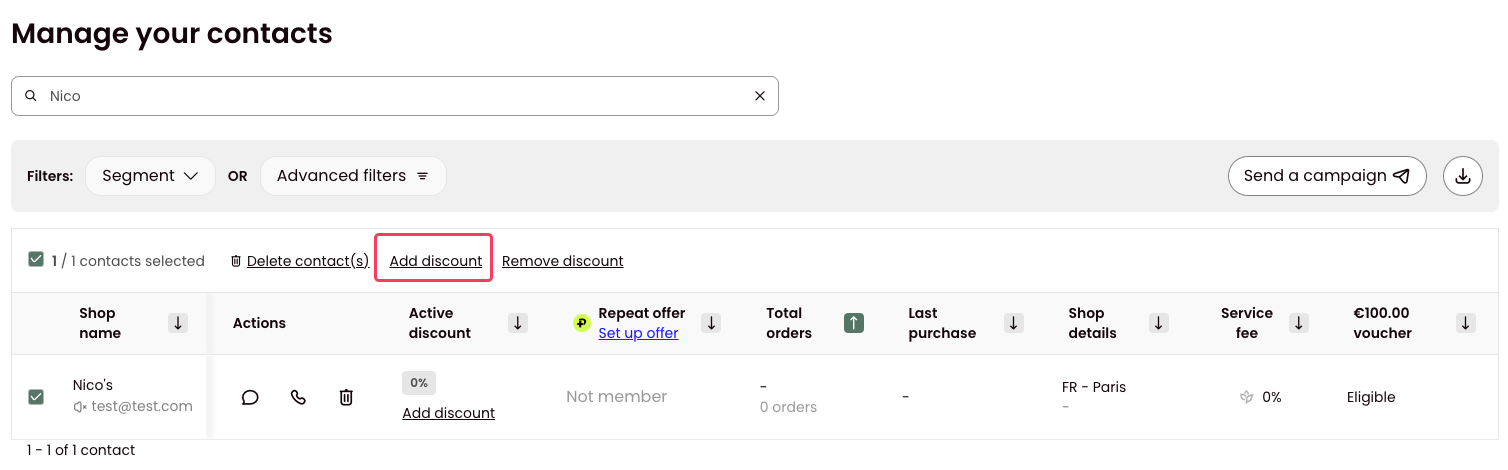
Examples of retailers to whom you can offer a personalised discount :
Retailers who haven’t ordered in over 6 months.
with items from your brand in their cart.
To find out more about discounts on Ankorstore, read our FAQ:
How to optimise communications in sync with Ankorstore's messaging
Ankorstore regularly communicates with its partner retailers via two types of messages :
Transactional messages (orders, payments, etc.)
Sales messages designed to drive purchases (new products, new brands, incentives for reordering, etc.)
To maximise the impact of your own communications with retailers, it is essential to work in a complementary way with Ankorstore's existing campaigns.
By linking your communications with those of the platform, you can enrich the retailer experience without creating competition or overloading them with information.
Example : every Monday, Ankorstore retailers receive an email listing all the new products added in the last 7 days by the brands they work with, or that they ‘follow’ on the platform.
We encourage you to share this information with your retailers too, and to make this communication even more powerful by providing additional context, such as the inspiration behind your new products or suggestions for matching them with other existing products.
Examples of other email campaigns regularly sent to retailers by Ankorstore :
A weekly email notifying them when brands they work with, or “follow” on the platform, add promotions to their catalogue.
A reminder sent some time after each order to encourage reorders.
A bi-monthly “Top Products” email, personalised for each retailer based on their shop type, purchase history, and browsing activity. This is where, for example, your top-selling product can be featured.
An email suggesting brands similar to those purchased by retailers on Ankorstore.
How can you communicate effectively with your retailers ?
Maximise the impact of your communications and transform your business relationships into lasting partnerships with advice from our experts.
Contact retailers to share key information about your brand :
Your brand identity
Your brand universe
Your products
Your values
Customise your approach to optimise your communications, by sharing :
Information about your product ranges (seasonal products, best-sellers).
Your new products and collections, along with key details and engaging storytelling to guide retailers in purchasing and, especially, reselling your products (e.g., inspirations, methods, and place of production).
Sales recommendations : assortment (e.g., products that are easy to sell together), merchandising, best-sellers, suggestions tailored to the shop’s profile (shop type and country), and field insights (tips from other retailers).
Discounted products with explanations on the reasons for these reductions (e.g., discounts on products from previous collections).
If you are sending email campaigns, we recommend personalising your email subject lines to increase the opening rate. If you are using the templates available on Ankorstore, feel free to adapt them to suit your brand.
Prioritise phone calls when possible
(e.g. you speak the same language as the retailer, or the list of retailers to contact is not too long)
Calling allows you :
to strengthen your relationships
share extra information effortlessly.
However, avoid contacting retailers who prefer not to receive calls. Also, note that if you only have a prospect's email address, it is best to reach out by email first.
Make your communications impactful and engaging
Retailers receive numerous messages from many brands. To catch their attention and encourage engagement, keep messages short and direct messages that encourage them to take action. For example, suggest that they :
Discover your new arrivals
Explore your bestsellers
Browse your seasonal collection
Restock as needed
Strategic communication guide by retail segment
To optimise your loyalty initiatives and encourage new and repeat orders, we have developed a precise communication framework based on purchasing behaviour analysis. The tables below detail our segmented and personalised approach, based on the best practices observed on the platform.
Tip : don't hesitate to prioritise contact with Ankorstore Plus retailers, as they are among the most loyal to the platform.
Use My Network to activate these recommendations and personalise your communications according to these criteria :
Regular communication | |||
Customer segment | Communications calendar | Goal | Examples of subjects to share with retailers (non-exhaustive list) |
|
| Maintain a strong commercial relationship with your most important customers | Sales recommendations: assortment, merchandising, advice tailored to the store’s profile, feedback from the field. |
|
| Stay in touch with your customers |
|
Ankorstore Plus | |||
Customer segment | Communications calendar | Goal | Examples of topics to share with retailers (non-exhaustive list) |
Retailers who are Ankorstore Plus members** | In the middle of each quarter | Encourage retailers to unlock their Ankorstore Repeat offer discount |
|
Retailers who are not Ankorstore Plus members** | Quarterly | Encourage your retailers to subscribe to Ankorstore Plus in order to benefit from your exclusive Repeat offer discount |
|
Items in cart | ||
Items in the cart | Goal | Examples of subjects to share with retailers (non-exhaustive list) |
Retailers with items from your brand in their shopping cart |
|
|
Prospects | |||
Customer segment | Communications calendar | Goal | Examples of subjects to share with retailers (non-exhaustive list) |
Prospects (retailers who have never ordered from your brand) | Every month (Once you have been in contact with your prospects, you can follow up a few days later) |
| Presentation of your brand (history, brand universe) and your product range. |
New customers | |||
Customer segment | Communications calendar | Goal | Examples of subjects to share with retailers (non-exhaustive list) |
Retailers who have ordered from your brand for the 1st time recently | - 1 month after the 1st order | - Getting to know your new customers. - Present your brand and products. | Presentation of your brand (history, brand universe) and your product range. |
Retailers who have already ordered from your brand | ||
Customer segment | Goal | Examples of subjects to share with retailers (non-exhaustive list) |
Retailers who have not ordered in the last 3 months |
|
|
Retailers who have not placed an order in the last 6 months*** |
| |
Retailers who have not placed an order in the last 9 months***. |
| |
*This definition may vary from one brand to another.
**If you are part of our Repeat Offer Discount programme:
***Ankorstore covers your shipping costs for six months on orders placed by your eligible retailers. For more details, read our FAQ article :
Prioritise phone calls or direct messages for personalised communication with your contacts. For a broader audience, consider a well-targeted email campaign instead.
Please note that while communication between brands and retailers is essential, messages should be relevant and sent at a reasonable frequency to avoid email fatigue and unsubscribes.
Best practice : Spread out the sending of your email campaigns over several days so that retailers don’t receive all your messages on the same day.
Warning : we recommend avoiding contact with retailers in the following situations :
Some retailers in My Network have indicated they no longer wish to be contacted.
Contacts who do not appear to be independent retailers.
Why are some retailers not receiving my campaigns ?
There are several reasons why an email might not reach a retailer :
They have unsubscribed from emails.
The email address is inactive.
The email was returned as undeliverable.
To find a list of retailers who did not receive your email campaign, go to the “Campaigns” tab and click on the relevant campaign to see all the details.
Glossary
Historical clients : clients with whom you can demonstrate a relationship prior to their registration on Ankorstore.
Prospects : retailers with whom you can demonstrate a relationship prior to their registration on Ankorstore.
Eligible retailers : we cover your shipping costs for six months on all orders placed by these retailers, specifically your inactive clients and prospects imported into My Network.