Manage your Shipping
Last updated: August 21, 2026
This guide outlines the essential steps to initiate a shipment, correct errors, and handle drop-off procedures. It also addresses the significance of shipping promises to maintain retailers trust and provides solutions for dealing with potential shipping delays.
How do I start the shipment process for my order?
Validate your order in the Ankorstore platform.
Select the ‘Shipping with Ankorstore’ option.
Carefully enter the correct weight and dimensions for your packages to ensure smooth processing.
What if you entered the wrong package details?
Only applicable if the Brand uses Ankorstore Partner carrier (UPS/DHL). ONLY possible if your order hasn’t been shipped yet and you haven’t booked a pick up slot.
You will be able to generate and print a shipping label at the order preparation stage, directly from the order tab of your personal space.
You can cancel the shipping labels generated to amend the shipment information.
After cancelling the current labels, you will have to re-enter all information again to create new shipping labels.
You will also need to rebook a pick-up slot as your original slot will automatically be cancelled.
You should NOT use any deleted labels.
If you have already printed them, you need to re-print and use the new labels - this is applicable to all circumstances, including changing the number of parcels in the shipment:
Step 1: Log into your account and go to the orders menu to access the order.
Step2: In the order page find the ‘Revert shipping labels’ link (marked in red below)
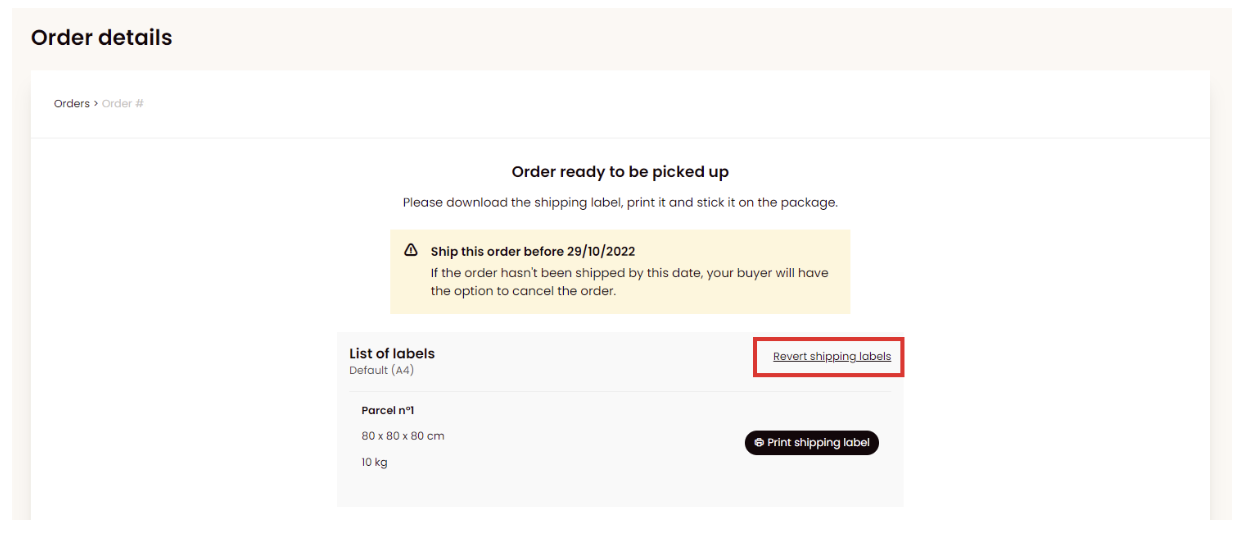
Step 3: Select the reason for label(s) cancellation. Tick the box confirming that they no longer be able to use the old labels once they are cancelled and confirm. The labels will be cancelled at this stage.
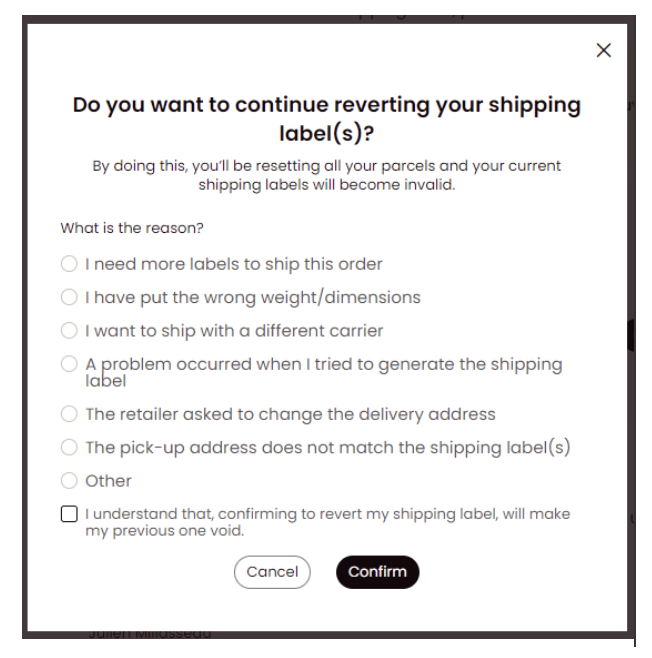
Step 4: Generate new labels and schedule a new pick-up slot.
What should you do if your package pickup is delayed?
Delays can happen due to high volumes or unexpected events.
If your pickup is delayed, contact Ankorstore with your order number for help.
Alternatively, you can drop off your package at the nearest carrier drop-off point if possible.
Can you drop off your package at a relay point?
Yes! Ankorstore allows you to drop off packages at local relay points for your convenience.
How to prepare your package for drop-off?
Fix any errors first, then download and attach the shipping labels from Ankorstore.
No need to schedule a pickup, simply bring your labeled package to a designated drop-off point.
What happens after drop-off?
Your package status will update automatically in your Ankorstore account once it's scanned at the drop-off point.
If there’s no update within 24 hours, report this by selecting “Problem with preparing my order” and provide your order number.Yes, you can. Ankorstore supports dropping off your package at local relay points for your convenience. This option allows you to leave your package at a trusted location where it will be securely held for pick-up by the carrier.
Can you postpone your shipment?
Reliable shipping is essential for trust with retailers.
Always try to ship within the agreed timeframe.
If you experience delays, communicate proactively with your retailer to reset expectations.
Adjust your shipping promise in the platform if your capacity changes.
Important Shipping Guidelines
Always include the correct street name, number, postal code, and city in the address.
Ship only to the address provided by Ankorstore.
Decline any request to change the delivery address, regardless of the reason.
Maintaining Retailer Trust
Fulfilling your promised shipping timeline is crucial.
Proactively communicate with your retailer in case of unavoidable delays to maintain a strong relationship.
Shipping Fresh, Refrigerated, and Frozen Products
Please note that our partner carriers (UPS and DHL) do not provide temperature-controlled transportation for perishable goods. This may increase the risk of damage, particularly in hot weather. To ensure the best possible care for fresh products, we recommend selecting a carrier equipped to handle temperature-sensitive shipments.
If you choose to ship perishable goods with our partner carriers, please be aware that currently we will not take responsibility for any damage that may occur during transit. For optimal results, selecting your own carrier for these shipments is advised.